Overview & First Impressions
When Garmin introduced the Striker 4, it immediately caught the attention of weekend anglers, kayak fishermen, and budget-conscious boaters who wanted reliable sonar without the premium price tag that usually accompanies the Garmin name. This fish finder has since become one of the best-selling units in its class, and for good reason. It delivers a surprisingly capable package that covers the fundamentals extremely well, even if it skips some of the bells and whistles found on more expensive models.
After spending extensive time testing the Striker 4 across different water conditions — from shallow freshwater ponds to deeper reservoirs and even some inshore saltwater environments — this review covers everything you need to know. We will dig into its sonar capabilities, display quality, GPS functionality, installation process, and how it stacks up against competing units in the same price range. Whether you are a first-time fish finder buyer or an experienced angler looking for a reliable backup unit, this breakdown will help you decide if the Striker 4 deserves a spot on your boat.
One of the first things you notice when unboxing the Garmin Striker 4 is how compact and lightweight the unit feels. Garmin has clearly designed this with smaller boats, kayaks, and canoes in mind, though it works perfectly well on larger vessels too. The build quality feels solid without being bulky, and the included hardware gives you everything you need to get started with a basic installation. The transducer is well-built, the power cable is generously long, and the mounting bracket feels sturdy enough to handle regular use on the water.
The interface is intuitive from the moment you power it on. Garmin has always excelled at making their electronics accessible to newcomers, and the Striker 4 is no exception. The menu system is straightforward, the buttons are responsive and well-labeled, and you can be up and running with a basic sonar view within minutes of installation. There is no steep learning curve here, which is a significant advantage for anglers who want to spend their time fishing rather than reading a thick manual.
What truly sets the Striker 4 apart from other fish finders in its price range is the quality of its CHIRP sonar. Garmin has packed their proven sonar technology into an affordable package, and the results speak for themselves. Fish arches are clearly defined, bottom structure is easy to read, and the separation between individual fish and the bottom is impressive for a unit at this price point. If you have been using an older or lower-quality fish finder, the difference will be immediately noticeable.
The built-in GPS is another standout feature that many competing units in this price range simply do not offer. Having the ability to mark waypoints, track your speed, and create routes adds a tremendous amount of value to the Striker 4. For anglers who fish the same spots repeatedly, the waypoint functionality alone can justify the purchase. You can mark productive fishing spots, underwater structure, drop-offs, and other features, then navigate back to them with precision on future trips.
Of course, no fish finder is perfect, and the Striker 4 does have its limitations. The screen size, while adequate for most situations, can feel cramped when you are trying to view multiple sonar panels simultaneously. The unit also lacks networking capabilities, meaning you cannot share data with other devices or connect to external sensors. And while the GPS functionality is useful, it does not include detailed cartography — you get a basic GPS plotter rather than a full chartplotter with preloaded maps.
Despite these limitations, the Garmin Striker 4 remains one of the best values in the fish finder market. It does the core things that matter most to anglers — finding fish, reading bottom structure, and marking productive spots — extremely well. For the price, it is very difficult to find a unit that offers this combination of sonar quality, build durability, and ease of use. Let us dive deeper into what makes this fish finder tick.
Who Is Garmin?
Before diving deeper into the Striker 4 itself, it is worth understanding the company behind it. Garmin was founded and has grown into one of the world’s leading manufacturers of GPS technology and marine electronics. The company produces a vast range of products spanning aviation, automotive, marine, outdoor recreation, and fitness markets. In the marine electronics space, Garmin is widely regarded as one of the top-tier brands, with a product lineup that ranges from budget-friendly fish finders like the Striker 4 all the way up to professional-grade multi-function displays used on sportfishing yachts and commercial vessels.
Garmin’s reputation for quality and reliability is well-earned. Their marine electronics are known for solid build quality, intuitive user interfaces, and excellent customer support. The company also has a strong track record of providing firmware updates that improve performance and add features to existing products, which means your Striker 4 may actually get better over time as Garmin releases software improvements.
This brand pedigree is one of the reasons the Striker 4 has been so successful. When you buy a Garmin product, you are not just buying a fish finder — you are buying into an ecosystem backed by one of the most trusted names in marine technology. This matters when you are miles from shore and relying on your electronics to help you find fish and navigate safely.
What Makes the Striker 4 Special
The fish finder market is crowded, with dozens of manufacturers competing for your attention at every price point. What makes the Striker 4 stand out in such a competitive landscape? The answer lies in Garmin’s decision to focus on the fundamentals rather than trying to pack every possible feature into a budget package.
Many budget fish finders try to attract buyers with long feature lists, but the actual implementation of those features often leaves much to be desired. The Striker 4 takes a different approach. Instead of offering mediocre versions of advanced features, Garmin concentrated on delivering excellent core performance — outstanding CHIRP sonar, reliable GPS, and a user-friendly interface — at an accessible price point.
This focus on fundamentals is evident in every aspect of the Striker 4. The CHIRP sonar is not just adequate — it is genuinely impressive for a unit at this price. The GPS is not just an afterthought — it is a fully functional system with ample waypoint storage and reliable position accuracy. The build quality is not just acceptable — it is robust enough to handle years of regular use in harsh marine environments. This commitment to doing the basics exceptionally well is what sets the Striker 4 apart from the competition.

Key Specifications & What’s in the Box
Understanding the full specifications of the Garmin Striker 4 helps you appreciate exactly what you are getting for your money. The unit features a 3.5-inch HVGA color display with a resolution of 480 by 320 pixels. While this is not the largest or highest-resolution screen on the market, it is more than adequate for reading sonar data clearly, especially when you consider the compact form factor that makes this unit ideal for smaller watercraft.
The sonar system operates on dual frequencies — 77 kHz and 200 kHz — using Garmin’s CHIRP technology. The 77 kHz frequency provides a wider cone angle for broader coverage, making it excellent for scanning larger areas and identifying fish schools spread across a wide swath of water. The 200 kHz frequency offers a narrower, more focused beam that delivers superior detail and target separation, which is particularly useful when you are trying to distinguish individual fish near the bottom or around structure.
Maximum depth capability is rated at 1,600 feet in freshwater conditions, which is more than enough for the vast majority of freshwater fishing scenarios. In saltwater, the maximum depth is rated at 750 feet, which still covers a wide range of inshore and nearshore fishing applications. These depth ratings assume ideal conditions, and actual performance may vary depending on water clarity, bottom composition, and other environmental factors.
What’s in the Box
Garmin includes everything you need for a basic installation right in the box. Here is what you will find when you open the package:
- Striker 4 display unit — The main head unit with a 3.5-inch color screen and physical button controls
- Dual-beam transducer — A trolling motor or transom-mount transducer with a built-in temperature sensor
- Transducer mounting hardware — Including a transom mount bracket, screws, and a trolling motor adapter
- Power cable — A generously long cable with bare wire leads for connecting to a 12V battery
- Display mounting bracket — A tilt/swivel bracket with mounting hardware for dashboard or console installation
- Documentation — Quick start guide and important safety information
The inclusion of both transom mount and trolling motor mounting options for the transducer is a nice touch that adds versatility. Many competing units only include one mounting option, forcing you to purchase additional hardware if your setup requires a different configuration. The power cable length is generous enough for most boat installations without requiring extensions, and the display bracket offers enough adjustment range to find a comfortable viewing angle regardless of where you mount it.
Build Quality and Durability
The Striker 4 carries an IPX7 water resistance rating, which means it can withstand incidental exposure to water — splashes, rain, spray, and even brief submersion up to one meter for 30 minutes. This is an important rating for any marine electronics, and the Striker 4 meets the standard that most anglers would expect. The housing feels rugged and well-constructed, with tight seams and a solid feel that inspires confidence when you are bouncing across choppy water.
The buttons on the front of the unit are rubberized and responsive, providing tactile feedback even when your hands are wet or you are wearing gloves. This is a significant practical advantage over touchscreen-only units, which can be frustrating to operate in real-world fishing conditions. The physical button layout is logical and easy to learn, with dedicated keys for common functions like marking waypoints, adjusting sonar settings, and switching between views.
The transducer itself is built to handle the rigors of marine use. The cable is well-insulated and flexible enough to route cleanly through your boat, and the connector is keyed to prevent incorrect installation. The transducer face is made from durable materials that resist scratching and fouling, though you will want to clean it periodically to maintain optimal sonar performance.
Available Models and Bundles
Garmin offers the Striker 4 in several configurations to suit different needs and budgets. The base model includes the standard dual-beam transducer, while upgraded bundles may include a more capable transducer, protective cover, or additional mounting hardware. There is also a Striker Plus 4 variant that adds Garmin’s Quickdraw Contours mapping feature, which allows you to create your own HD maps of the waters you fish. Understanding the differences between these models can help you choose the right one for your specific needs, and we will cover those distinctions in more detail later in this review.
Display Quality & User Interface
The display is your primary interaction point with any fish finder, and it plays a crucial role in how effectively you can interpret the information the unit provides. The Garmin Striker 4 features a 3.5-inch diagonal HVGA color display that, while compact, delivers surprisingly good performance for its size and price point.
Screen Size and Resolution
At 3.5 inches, the Striker 4’s screen is on the smaller end of the fish finder spectrum. For context, many mid-range fish finder screens measure 5 to 7 inches, and premium models can reach 9 to 16 inches. However, the 3.5-inch form factor is actually a deliberate design choice that serves specific use cases extremely well. Kayak anglers, for example, often prefer smaller screens because they take up less space on a crowded deck and are less likely to be damaged during transport. Similarly, anglers with small boats or limited console space appreciate the compact footprint.
The 480 by 320 pixel resolution translates to approximately 167 pixels per inch, which is adequate for displaying clear sonar imagery. Fish arches are well-defined, bottom structure is easy to distinguish, and text is readable at normal viewing distances. The color reproduction is good, with distinct color palettes that make it easy to differentiate between fish, structure, bottom composition, and water column at a glance.
Visibility and Brightness
One area where the Striker 4 performs admirably is screen visibility. The display is bright enough to read in most lighting conditions, including direct sunlight. While it may wash out slightly in extremely bright conditions with direct overhead sun, this is a common limitation of fish finders in this price range. Tilting the screen to reduce glare — which the adjustable mounting bracket makes easy — resolves most visibility issues.
In low-light conditions, early morning, late evening, and overcast days, the display performs excellently. The color sonar imagery is vibrant and easy to interpret, and the adjustable backlight allows you to reduce brightness to comfortable levels for night fishing without draining excessive battery power. The night mode color scheme is well-designed, reducing eye strain during extended after-dark sessions.
Menu System and Navigation
Garmin has designed the Striker 4’s user interface with simplicity and efficiency in mind. The menu system is organized into logical categories that are easy to navigate using the physical buttons on the front of the unit. The main menu provides access to sonar settings, GPS functions, system configuration, and display options, each organized into clearly labeled submenus.
The button layout consists of a directional pad with a center select button, flanked by dedicated power/menu and waypoint buttons. This arrangement allows for one-handed operation once you are familiar with the layout, which is important when you are trying to adjust settings while actively fishing. The buttons provide satisfying tactile feedback, and the menu response is quick with no noticeable lag between button presses and on-screen actions.
Sonar Display Modes
The Striker 4 offers several sonar display modes that cater to different fishing situations and preferences:
- Traditional Sonar View — The classic scrolling sonar display that shows a continuous history of sonar returns. This is the view most anglers are familiar with and is excellent for identifying fish arches, bottom structure, and depth changes over time.
- Flasher View — A real-time circular display that is particularly popular with ice fishermen and vertical jigging enthusiasts. The flasher shows instant sonar returns, making it ideal for watching your lure and detecting bites in real time.
- Split-Screen View — Allows you to view two different sonar views simultaneously, such as traditional sonar alongside the flasher, or two different frequency views side by side. This is useful for comparing data from different sonar beams or monitoring multiple aspects of the underwater environment at once.
The ability to switch between these views quickly and customize the split-screen layout adds significant versatility to the Striker 4. While the 3.5-inch screen can feel a bit cramped in split-screen mode, the information is still readable and useful, especially once you become familiar with the sonar imagery.
Color Palettes and Customization
Garmin provides several color palette options for the sonar display, allowing you to choose the scheme that works best for your preferences and current conditions. The default palette uses a traditional blue-background scheme that most anglers find intuitive, but alternative palettes offer different color combinations that may provide better contrast in specific lighting conditions or against certain bottom types.
Beyond color palettes, the Striker 4 allows you to customize various display parameters including sensitivity, scroll speed, depth range, and zoom level. These adjustments can be made on the fly, allowing you to optimize the display for changing conditions as you move across the water. The unit also offers an auto-gain feature that automatically adjusts sonar sensitivity based on conditions, which is helpful for beginners who may not yet be comfortable with manual adjustments.
Display Zoom and A-Scope Features
The Striker 4 includes several display features that enhance your ability to interpret sonar data. The zoom function allows you to magnify a specific portion of the water column, which is particularly useful when fish are holding at a specific depth or when you want to examine bottom structure in greater detail. You can zoom in on the entire water column or use the “bottom lock” zoom feature that magnifies the area just above the bottom, where many fish species spend their time.
The A-Scope feature provides a real-time vertical flasher-style display alongside the traditional scrolling sonar view. This gives you instant feedback on what is directly beneath the boat while still maintaining the historical perspective of the scrolling display. The A-Scope is particularly useful when you are stationary or moving slowly, as it shows fish and structure as they pass through the sonar beam in real time.
These display features, combined with the customizable color palettes and adjustable sonar parameters, give you a high degree of control over how the sonar information is presented. While the 3.5-inch screen limits how much information you can view simultaneously, the available display modes and customization options ensure that you can optimize the presentation for any fishing situation.
Understanding Screen Layout and Information Overlays
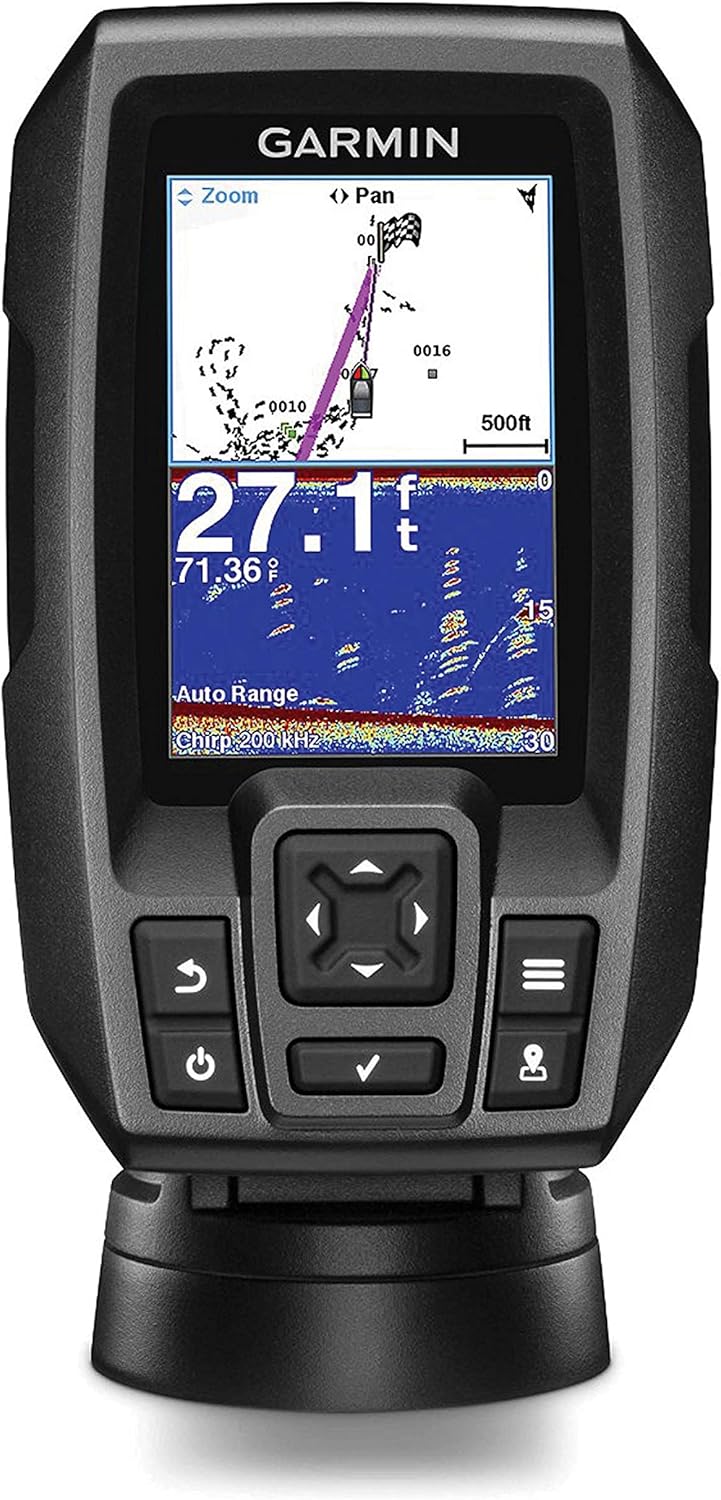
The Striker 4’s screen layout is designed to present the most important information clearly and efficiently. The sonar display occupies the majority of the screen, with a status bar along the top or bottom that shows key data such as depth, water temperature, boat speed, and current sonar frequency. This information overlay can be customized to show the data points that are most relevant to your fishing situation.
The depth reading is always prominently displayed, as it is the single most important piece of information for most anglers. The depth figure updates continuously and is accurate to within a few inches, giving you precise knowledge of the water depth at your current location. The water temperature reading is displayed alongside the depth, providing real-time thermal data that helps you identify temperature breaks and locate fish-holding areas.
When using the GPS features, the screen can display your current coordinates, speed, heading, and distance to the nearest waypoint. This information is presented in a clean, uncluttered format that does not interfere with the sonar display. The ability to toggle these information overlays on and off allows you to customize the screen layout to match your preferences and current needs.
Get the Garmin Striker 4
Trusted by thousands of anglers worldwide. Check current pricing on Amazon.
View on Amazon →Sonar Technology Deep Dive
The heart of any fish finder is its sonar system, and this is where the Garmin Striker 4 truly distinguishes itself from the competition. Garmin has leveraged their extensive experience in marine electronics to deliver a sonar package that punches well above its weight class, offering performance characteristics that you would typically expect to find on more expensive units.
Understanding CHIRP Sonar
CHIRP stands for Compressed High-Intensity Radiated Pulse, and it represents a significant advancement over traditional single-frequency sonar technology. Traditional sonar sends out a single pulse at a fixed frequency and listens for the return. CHIRP sonar, by contrast, sweeps across a range of frequencies within each pulse, sending out a longer transmission that covers multiple frequencies simultaneously.
The practical benefit of CHIRP technology is dramatically improved target resolution and clarity. Because the sonar is processing returns across a range of frequencies, it can distinguish between targets that are very close together — both horizontally and vertically. This means individual fish that might appear as a single blob on a traditional sonar are more likely to show up as distinct, separate targets on the Striker 4’s CHIRP sonar.
The improved resolution also translates to better-defined fish arches. On traditional sonar, fish arches can be incomplete, broken, or difficult to distinguish from bottom clutter. CHIRP sonar produces cleaner, more consistent arches that make fish identification significantly easier, especially for anglers who are still developing their sonar interpretation skills. If you are learning how to read a fish finder, CHIRP technology makes the learning curve much gentler.
Dual-Beam Sonar Coverage
The Striker 4’s transducer operates at two frequencies — 77 kHz and 200 kHz — each offering distinct advantages for different fishing situations. Understanding how to leverage both frequencies will help you get the most out of your fish finder.
The 77 kHz frequency produces a wider cone angle, typically around 45 degrees, which covers a larger area of the water column beneath your boat. This wide coverage is excellent for searching for fish, identifying schools, and getting a general picture of what lies below. When you are trolling or moving across an area looking for active fish, the 77 kHz beam provides the broadest view and increases your chances of detecting fish that might be off to the sides of your boat.
The 200 kHz frequency produces a narrower cone angle, usually around 15 degrees, which concentrates the sonar energy into a tighter beam. This focused beam delivers superior detail and target separation, making it the better choice when you have located fish or structure and want to examine it closely. The narrower beam also provides more accurate depth readings and better bottom definition, which is valuable when you are fishing around subtle structure changes or trying to identify specific bottom types.
Depth Performance
The Striker 4 is rated to a maximum depth of 1,600 feet in freshwater and 750 feet in saltwater. These figures represent the maximum depth at which the sonar can detect the bottom under ideal conditions. In practice, the actual usable depth may be somewhat less depending on water conditions, bottom composition, boat speed, and other factors.
For freshwater applications, the 1,600-foot rating covers virtually every lake, river, and reservoir that most recreational anglers will encounter. Even the deepest natural lakes in North America are well within the Striker 4’s capabilities. For saltwater anglers, the 750-foot rating covers most inshore and nearshore applications, including reef fishing, coastal structure fishing, and nearshore bottom fishing.
In our testing, the Striker 4 consistently delivered clear bottom readings and fish detection at depths well beyond what most anglers will need. The sonar maintained good sensitivity even at greater depths, and the CHIRP technology helped maintain target separation that would be difficult to achieve with traditional single-frequency sonar at similar depths.
Target Separation and Fish ID
One of the most important performance characteristics of any fish finder is its ability to distinguish individual targets — a metric known as target separation. The Striker 4’s CHIRP sonar provides excellent target separation for its price class, allowing you to identify individual fish even when they are suspended close together or near the bottom.
The unit offers a Fish ID feature that uses algorithms to identify sonar returns that match the profile of fish and display them as fish icons on the screen. While many experienced anglers prefer to read raw sonar data rather than relying on Fish ID, this feature can be helpful for beginners who are still learning to interpret sonar imagery. The Fish ID sensitivity can be adjusted to reduce false readings, and the feature can be turned off entirely if you prefer to read the raw sonar returns.
For anglers who want to improve their sonar reading skills, the Striker 4 provides an excellent platform for learning. The clear CHIRP sonar imagery makes it easier to identify the visual signatures of fish, structure, and bottom composition, building the foundational skills that will serve you well regardless of what fish finder you use in the future. Our guide on how to use a fish finder covers these skills in more detail.
Water Temperature Sensing
The included transducer features a built-in temperature sensor that continuously monitors water temperature. This is a valuable feature for anglers because water temperature directly influences fish behavior, metabolism, and location. Knowing the water temperature helps you make informed decisions about where to fish, what techniques to use, and what lures or baits to present.
The temperature reading is displayed on the screen and can be monitored over time to identify temperature breaks, thermoclines, and other thermal features that often concentrate fish. The sensor is responsive enough to detect subtle temperature changes as you move across the water, and the readings are accurate enough to be genuinely useful for making fishing decisions.
Scroll Speed and Sensitivity Adjustments
The Striker 4 provides full control over sonar scroll speed and sensitivity, allowing you to optimize the display for different conditions and fishing techniques. Scroll speed controls how quickly the sonar history moves across the screen, with slower speeds providing more detail in a given area and faster speeds covering more ground. The optimal scroll speed depends on your boat speed and the level of detail you need — slower speeds for stationary or slow-trolling situations, and faster speeds when covering water quickly.
Sensitivity (also called gain) controls how much detail the sonar displays. Higher sensitivity reveals more detail but can also introduce noise and clutter, while lower sensitivity provides a cleaner display but may miss subtle returns. The auto-gain feature does a reasonable job of finding the right balance, but experienced anglers will want to fine-tune the sensitivity manually for optimal results in different conditions.
How CHIRP Compares to Traditional Sonar
To fully appreciate what the Striker 4’s CHIRP sonar brings to the table, it helps to understand how it differs from the traditional single-frequency sonar found on many older and lower-priced fish finders. Traditional sonar sends out a single pulse at a fixed frequency — typically 200 kHz or 83 kHz — and measures the time it takes for the echo to return. While this approach works, it has inherent limitations in terms of target resolution and the ability to distinguish between closely spaced targets.
CHIRP sonar overcomes these limitations by sweeping through a range of frequencies during each pulse. The Striker 4’s CHIRP system transmits across a band of frequencies centered around 77 kHz and 200 kHz, processing the returns from all frequencies to create a composite picture that is far more detailed than what any single frequency can provide.
The practical difference is immediately noticeable when you compare the two side by side. On a traditional sonar, fish that are close together or near the bottom often appear as a single, indistinct blob. On the Striker 4’s CHIRP sonar, those same fish are more likely to appear as distinct, individual targets with clear separation between them. This improved resolution makes it significantly easier to count fish in a school, identify the size of individual fish, and distinguish fish from bottom structure or vegetation.
Another advantage of CHIRP technology is improved noise rejection. Because the sonar is processing returns across a range of frequencies, it can more effectively filter out noise and interference from other sonar units, boat engines, and environmental sources. This results in a cleaner display with less clutter, making it easier to focus on the information that matters — the fish and structure beneath your boat.
Understanding Sonar Cone Angles
The sonar cone angle is an important but often overlooked specification that affects how the Striker 4 performs in different situations. The cone angle determines the width of the sonar beam as it travels through the water, and it has a direct impact on coverage area and target detail.
The 77 kHz beam on the Striker 4 has a cone angle of approximately 45 degrees, which creates a wide coverage area that expands as the beam travels deeper. At a depth of 100 feet, the 77 kHz beam covers a circular area roughly 80 feet in diameter. This wide coverage is excellent for searching for fish and getting a broad picture of the underwater environment, but it comes at the cost of reduced detail since the sonar energy is spread over a larger area.
The 200 kHz beam has a much narrower cone angle of approximately 15 degrees, which concentrates the sonar energy into a tighter, more focused beam. At 100 feet deep, the 200 kHz beam covers an area roughly 26 feet in diameter. While this is significantly less coverage than the 77 kHz beam, the concentrated energy provides much better detail and target separation within that smaller area.
Understanding these cone angles helps you choose the right frequency for your situation. When you are searching for fish over a wide area, the 77 kHz beam is the better choice because it covers more water. When you have located fish or structure and want to examine it closely, switching to the 200 kHz beam provides the detailed view you need. Many experienced anglers use the split-screen mode to display both frequencies simultaneously, giving them the best of both worlds.
Transducer Technology Explained
The transducer is the unsung hero of any fish finder system, and the Striker 4’s included transducer is a capable piece of engineering that deserves closer examination. The transducer converts electrical energy into sound waves (sonar pulses) and then converts the returning echoes back into electrical signals that the display unit can process and display.
The Striker 4’s transducer uses a ceramic element that vibrates at the specified frequencies when electrical current is applied. This element is housed in a durable, hydrodynamic housing designed to minimize drag and turbulence when mounted on a moving boat. The housing is filled with a potting compound that protects the ceramic element from water intrusion and physical damage while allowing sound waves to pass through efficiently.
The transducer also incorporates a built-in temperature sensor, typically a thermistor, that measures the water temperature at the transducer location. This sensor is in direct contact with the water (or very close to it), providing accurate and responsive temperature readings that update continuously as you move across the water.
GPS Functionality & Waypoint Management
The inclusion of a built-in GPS receiver is one of the Garmin Striker 4’s most compelling features, especially considering its price point. Many competing fish finders in this range either lack GPS entirely or offer it only as an expensive add-on. Having GPS integrated directly into the fish finder adds a layer of functionality that significantly enhances the overall fishing experience.
GPS Performance and Accuracy
The Striker 4’s GPS receiver provides reliable position accuracy that is more than sufficient for fishing applications. Position fixes are acquired quickly — typically within a minute of powering on in open areas — and the receiver maintains a strong satellite lock even in challenging conditions such as heavy cloud cover or light tree canopy along shorelines.
The GPS updates your position continuously as you move, providing real-time speed and heading information that is displayed on the screen. This is useful for maintaining consistent trolling speeds, monitoring drift rate and direction, and keeping track of your position relative to marked waypoints. The speed reading is accurate enough to be genuinely useful for trolling applications, where maintaining a specific speed range can be critical for lure presentation.
Waypoint Marking and Navigation
The Striker 4 can store up to 5,000 waypoints, which is more than enough for even the most dedicated waypoint junkie. Marking a waypoint is as simple as pressing the dedicated waypoint button on the front of the unit, which instantly saves your current GPS coordinates with a sequential number and icon. You can also customize waypoint names and icons to make them easier to identify later.
Navigating to a saved waypoint is straightforward. Select the waypoint from your list, and the unit displays a compass rose showing the direction and distance to the target. This simple navigation system is surprisingly effective for getting back to productive fishing spots, underwater structure, launch ramps, or any other location you want to remember. While it lacks the detailed cartography of a full chartplotter, the basic GPS plotter functionality is genuinely useful for anglers who fish the same waters regularly.
Track Recording
The Striker 4 automatically records your track — the path you have traveled — as you move across the water. This breadcrumb trail is displayed on the GPS plotter screen, allowing you to see where you have been and retrace your path if needed. The track recording is particularly useful when exploring new waters, as it helps you avoid running aground in shallow areas and provides a visual reference for areas you have already covered.
The track log can store a substantial amount of track data, and you can clear it when needed to start fresh. While the Striker 4 does not offer the ability to save and reload individual tracks (a feature found on more advanced units), the basic track recording functionality is a valuable tool for navigation and situational awareness on the water.
Speed and Temperature Data
In addition to position data, the GPS provides accurate speed-over-ground readings that are displayed in real time. You can choose between miles per hour, kilometers per hour, or knots depending on your preference. The speed reading is useful for maintaining trolling speeds, monitoring drift speed, and gauging your progress when traveling between fishing spots.
The water temperature data from the transducer’s built-in sensor can be displayed alongside the GPS information, giving you a comprehensive picture of the conditions at your current location. By marking waypoints at temperature breaks or thermocline boundaries, you can build a valuable database of thermal features that concentrate fish in your favorite waters.
Limitations of the GPS System
It is important to understand what the Striker 4’s GPS system does not provide. Unlike Garmin’s chartplotters, the Striker 4 does not include preloaded maps or detailed cartography. The GPS plotter shows your position, track, and waypoints on a blank background without shoreline contours, depth contours, navigation aids, or other map features. This means you cannot use the Striker 4 for detailed navigation or route planning the way you could with a dedicated chartplotter.
Additionally, the Striker 4 does not support external map cards or chart downloads. You are limited to the basic GPS plotter functionality, which is adequate for marking and navigating to waypoints but falls short of providing the comprehensive mapping capabilities that some anglers may want. If detailed mapping is a priority for you, consider stepping up to the Striker Plus series or a Garmin ECHOMAP unit, which offer full chartplotter functionality with preloaded maps and support for additional cartography.
Despite these limitations, the GPS functionality in the Striker 4 is a genuine value-add that sets it apart from many competing units. For anglers who primarily need waypoint marking and basic navigation, the GPS system works well and adds significant utility to the fish finder. If you are looking at the broader market, our guide to the best fish finders covers units with more advanced GPS and mapping capabilities.
Practical GPS Tips for Anglers
Getting the most out of the Striker 4’s GPS system requires some strategic thinking about how you use waypoints and tracks on the water. Here are some practical tips that experienced anglers use to maximize the value of the GPS functionality:
Create a waypoint naming convention: While the Striker 4 assigns sequential numbers to waypoints by default, developing a consistent naming system helps you quickly identify what each waypoint represents. Some anglers use abbreviations like “BR-20” for a brush pile at 20 feet, “RK-PNT” for a rocky point, or “CH-35” for a creek channel at 35 feet. This system makes it easy to find specific types of structure when you are planning a fishing trip.
Mark waypoints at multiple scales: When you find a productive area, mark waypoints at different levels of detail. Mark the general area first, then mark specific spots within that area — the exact brush pile, the depth transition, the rock pile, the weed edge. This hierarchical approach helps you navigate efficiently and gives you options depending on the conditions.
Use the GPS speed display for trolling: The real-time speed display is invaluable for trolling, where maintaining a specific speed range can be critical for lure presentation. Many popular trolling lures perform best within a narrow speed window, and the Striker 4’s GPS speed display helps you stay in that sweet spot. The speed reading is more accurate than most boat speedometers because it measures speed over ground rather than speed through water.
Track your drift: When drifting for fish, the track recording feature shows you exactly where you have been, helping you identify productive drift lines and avoid unproductive areas. If you find that you are catching fish on a particular drift line, you can use the GPS to reposition your boat and repeat that exact drift on subsequent passes.
Mark launch and landing spots: Always mark your launch ramp or landing spot as a waypoint before heading out. This simple step can save you a lot of time and frustration, especially in unfamiliar waters or when visibility is reduced due to fog, darkness, or rain. Having a waypoint for your take-out point gives you a reliable target to navigate toward at the end of the day.
Ready to Upgrade Your Fishing?
The Garmin Striker 4 delivers GPS and CHIRP sonar at a budget-friendly price.
Check Price on Amazon →Installation & Setup Guide
One of the Garmin Striker 4’s greatest strengths is how easy it is to install. Whether you are mounting it on a bass boat, kayak, canoe, or jon boat, the process is straightforward enough that most anglers can handle it without professional help. This section walks you through the installation process step by step, covering both the display unit and the transducer.
Choosing a Mounting Location for the Display
The first step is deciding where to mount the display unit. The ideal location should meet several criteria: it should be within easy reach while fishing, visible from your normal fishing position, protected from direct water spray as much as possible, and close enough to the transducer cable and power source to avoid excessive cable runs.
For boats with a console, the most common mounting location is on the console itself, either on top or on the front face where it is easily visible while driving. The included tilt/swivel bracket allows you to adjust the viewing angle to account for glare and your seated or standing position. For smaller boats without a console, mounting on the gunwale or a custom bracket is a popular option.
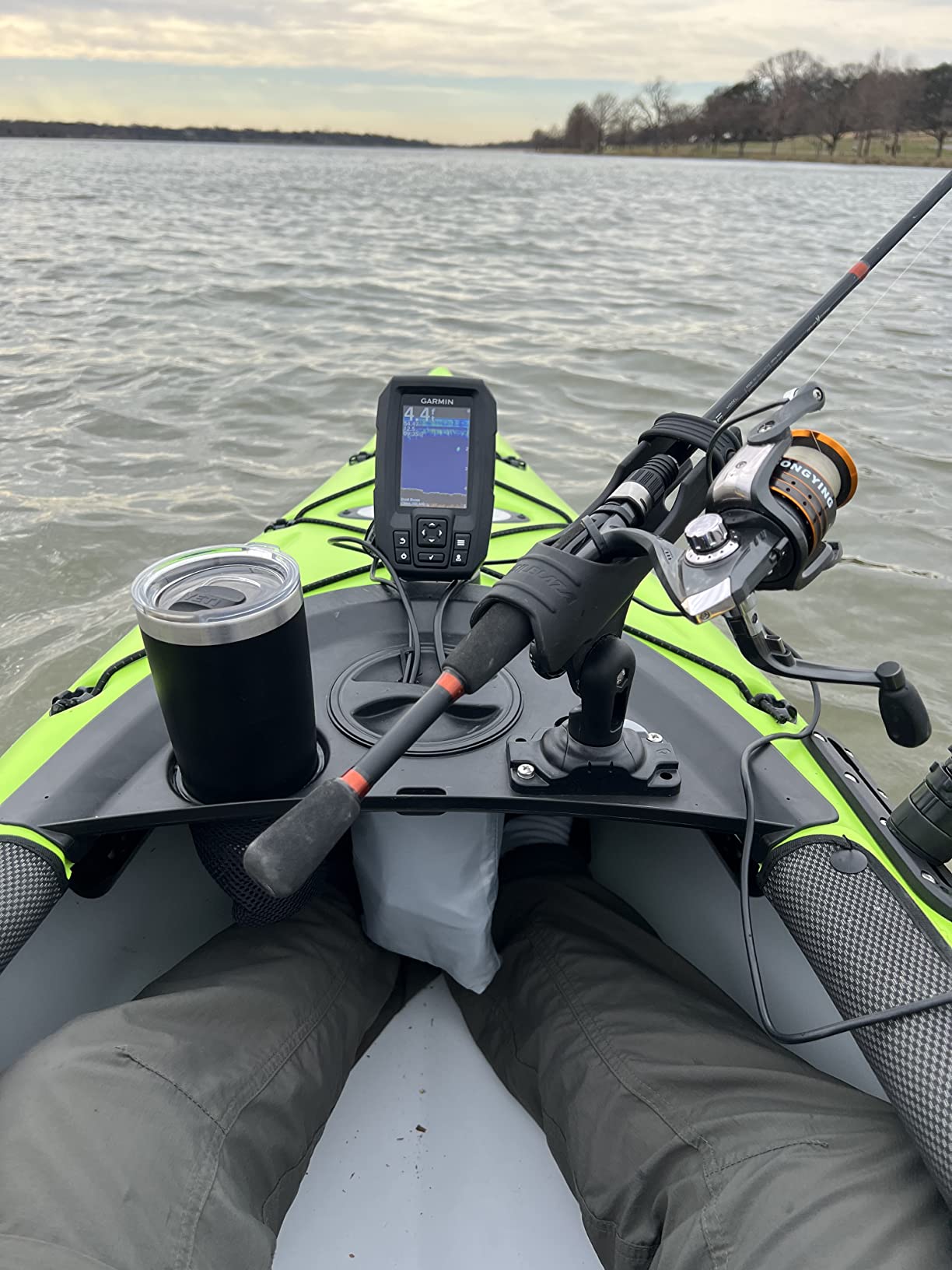
Kayak anglers have several mounting options, including RAM mounts, rail mounts, and dedicated kayak fish finder mounts that attach to the kayak’s existing accessory tracks. The Striker 4’s compact size makes it an excellent choice for kayak installations where space is at a premium. Many kayak anglers mount the display within arm’s reach so they can mark waypoints and adjust settings without reaching across the deck.
Transducer Mounting Options
The transducer is the component that actually sends and receives sonar signals, and its mounting location and orientation are critical for optimal performance. The Striker 4’s transducer can be mounted in several ways, each with its own advantages and considerations.
Transom Mount: The most common mounting method for boats with an outboard or stern drive. The transducer is mounted on the transom (the flat back surface of the boat) using the included bracket and hardware. The transducer should be positioned so that it is always submerged, even when the boat is on plane, and oriented so that the face is parallel to the water surface. A small amount of the transducer face should be below the bottom of the hull for optimal performance.
Trolling Motor Mount: For anglers who use a trolling motor, mounting the transducer on the trolling motor shaft or head is a popular option. Garmin includes a trolling motor adapter with the Striker 4, making this a straightforward installation. The advantage of a trolling motor mount is that the transducer is always pointed in the direction you are moving, providing real-time sonar data of the water you are actively fishing.
Through-Hull Mount: While not as common for the Striker 4’s target market, through-hull mounting is an option for boats with fiberglass hulls. This method involves mounting the transducer inside the hull against the bottom of the boat, using a waterproof epoxy to create a sonar window. Through-hull mounting eliminates the drag and potential damage associated with external transducer mounting, but it requires careful installation and may not work well with aluminum hulls.
Wiring and Power Connection
The Striker 4 operates on 12V DC power and comes with a power cable that has bare wire leads for connecting to your boat’s electrical system. The red wire connects to the positive terminal and the black wire to the negative terminal. It is recommended to connect the power cable directly to your boat’s battery or through a dedicated fused circuit.
Garmin recommends using a 3-amp fuse on the positive power lead to protect the unit from electrical surges. While the fuse is not included in the box, it is an inexpensive and important safety measure that should not be skipped. A blown fuse is far preferable to a damaged fish finder.
When routing the power cable and transducer cable, take care to keep them away from other electrical wiring, particularly ignition wires and electric motor cables, which can introduce electrical noise into the sonar signal. Using cable ties and wire loom to secure and protect the cables results in a clean, professional-looking installation that will hold up well over time.
Initial Setup and Configuration
Once the display and transducer are mounted and connected, the initial setup process is quick and painless. Power on the unit and it will guide you through basic configuration options including language selection, units of measurement (imperial or metric), and sonar frequency preferences. The setup wizard is intuitive and takes only a few minutes to complete.
After the initial setup, you will want to fine-tune the sonar settings for your specific fishing conditions. Start with the auto-gain setting and adjust from there based on what you see on the display. Set the depth range to auto initially, which allows the unit to automatically adjust the depth scale based on the water depth. As you become more familiar with the unit, you may prefer to set the depth range manually for more consistent sonar imagery.
Troubleshooting Common Installation Issues
Even with a straightforward installation like the Striker 4, you may encounter some common issues. Here are solutions to the most frequent problems:
- Poor sonar readings or excessive noise: Check that the transducer is properly oriented and fully submerged. Ensure the transducer cable is routed away from electrical interference sources. Try adjusting the sensitivity or switching between manual and auto gain.
- No depth reading: Verify that the transducer is in the water and not out of the water when the boat is on plane. Check all cable connections for security and corrosion. Ensure the transducer face is clean and free of fouling.
- GPS not acquiring satellites: Ensure the unit has a clear view of the sky. Initial satellite acquisition can take up to a few minutes, especially in new locations. If the unit is mounted in an enclosed area, it may struggle to acquire a signal.
- Display is difficult to read: Adjust the viewing angle using the tilt/swivel bracket. Increase the backlight brightness for bright conditions. Try different color palettes to find one that provides better contrast in your specific lighting conditions.
Installation Tips for Specific Boat Types
Different boat types present unique installation challenges, and understanding the best approach for your specific vessel will help you achieve optimal performance from your Striker 4.
Bass Boats: On bass boats with a trolling motor, mounting the transducer on the trolling motor is often the best option because it provides sonar coverage in the direction you are fishing. Mount the display on the console where it is visible from both the driver’s seat and the front deck. Use the trolling motor mount adapter that comes with the Striker 4 for a clean, secure installation.
Aluminum Jon Boats: Jon boats are popular platforms for the Striker 4, and installation is straightforward. The transom mount works well for the transducer, and the compact display fits easily on the flat transom or a simple mounting board. For boats without a built-in electrical system, a small 12V battery mounted under a seat provides clean, portable power.
Pontoon Boats: Pontoon boats present a unique challenge because the hull design can interfere with transducer mounting. The best approach is usually to mount the transducer on one of the pontoon tubes using a specialized bracket, or to use a through-hull mounting approach on the flat bottom between the tubes. The display can be mounted on the helm console or on a rail-mounted bracket.
Kayaks: Kayak installation requires careful planning due to limited space and the need for a waterproof, secure setup. Popular mounting locations for the display include the gunwale, a rail system, or a RAM mount attached to the kayak’s seat. For the transducer, options include a scupper mount (if your kayak has compatible scupper holes), a transom-style mount on the stern, or a shoot-through hull installation using marine epoxy.
Professional Installation vs. DIY
While the Striker 4 is designed for easy DIY installation, some anglers prefer to have their fish finder professionally installed. Professional installation typically costs between $50 and $150 depending on the complexity of the installation and your location. This can be a worthwhile investment if you are not comfortable drilling holes in your boat, routing cables, or working with electrical connections.
However, for most anglers, the Striker 4’s straightforward installation process makes professional installation unnecessary. The included hardware, clear instructions, and simple wiring make this a project that most boat owners can complete in an hour or two with basic tools. If you can use a drill, screwdriver, and wire strippers, you can install the Striker 4 yourself.
Real-World Performance on the Water
Specifications and features only tell part of the story. What really matters is how the Garmin Striker 4 performs when you are actually on the water, chasing fish. After extensive testing across a variety of conditions and environments, here is how the Striker 4 holds up in real-world fishing scenarios.
Freshwater Lake Performance
In freshwater lakes, the Striker 4 truly shines. The CHIRP sonar delivers crisp, well-defined fish arches that are easy to identify, even for anglers who are relatively new to reading sonar. The dual-frequency capability allows you to switch between broad coverage mode (77 kHz) for searching and detailed mode (200 kHz) for close examination of specific areas.
During testing on a variety of freshwater lakes ranging from 10 to over 100 feet deep, the Striker 4 consistently provided accurate depth readings, clear bottom definition, and reliable fish detection. The unit excelled at identifying suspended fish, which can be challenging for lesser fish finders. Schools of crappie, bluegill, and bass showed up clearly, with individual fish distinguishable within the school when using the 200 kHz frequency.
Bottom composition was easy to read, with clear distinctions between hard bottom, soft mud, rock, and vegetation. This information is invaluable for targeting species that relate to specific bottom types, and the Striker 4 makes it easy to identify these transitions as you move across the lake. The ability to mark waypoints at productive bottom transitions and return to them on future trips adds significant value to the fishing experience.
River and Stream Performance
Rivers and streams present unique challenges for fish finders due to current, turbulence, and constantly changing depth. The Striker 4 handles these conditions admirably, though some adjustments to the sonar settings are typically necessary for optimal performance.
In river environments, reducing the scroll speed and adjusting the sensitivity helps produce cleaner sonar imagery by accounting for the boat’s movement with the current. The CHIRP sonar does a good job of cutting through the turbulence and debris that are common in river environments, providing useful fish detection even in less-than-ideal conditions.
The GPS functionality is particularly valuable in river environments, where productive fishing spots such as current seams, eddies, and deep holes can be difficult to relocate without a waypoint marker. Being able to mark these spots and navigate back to them precisely is a significant advantage for river anglers.
Kayak Fishing Performance
The Striker 4 is arguably one of the best fish finders available for kayak fishing, and its performance in this application is outstanding. The compact size, lightweight construction, and low power consumption make it ideal for the unique constraints of kayak fishing.
On the water, the Striker 4 provides kayak anglers with the same sonar quality and GPS functionality that larger boat anglers enjoy, but in a package that does not overwhelm a kayak’s limited space and power budget. The unit draws minimal current, meaning it can run for extended periods on a small 12V battery without draining it completely. Many kayak anglers report running the Striker 4 for an entire day of fishing on a single charge of a small lithium battery.
The flasher display mode is particularly popular among kayak anglers, especially those who practice vertical jigging or drop-shot techniques. The real-time display shows your lure and any fish in the water column directly below the kayak, providing instant feedback that helps you adjust your presentation and detect subtle bites.
Saltwater Inshore Performance
While the Striker 4 is primarily marketed as a freshwater fish finder, it is fully capable of handling inshore saltwater applications. The IPX7 water rating provides adequate protection against the saltwater environment, though you will want to rinse the unit with fresh water after each saltwater use to prevent corrosion.
In saltwater testing, the Striker 4 provided good fish detection and bottom readings in water depths up to about 60 feet, which covers the majority of inshore fishing scenarios. Redfish, speckled trout, flounder, and other inshore species showed up clearly on the sonar, and the ability to mark productive spots with waypoints was invaluable for return trips.
One limitation in saltwater is the lack of detailed coastal charts. The basic GPS plotter is useful for marking waypoints, but without shoreline contours and depth contours, it is less helpful for navigating unfamiliar coastal waters. For dedicated saltwater anglers, a unit with built-in coastal charts may be a better choice, but for occasional inshore use, the Striker 4 is more than adequate.
Ice Fishing Performance
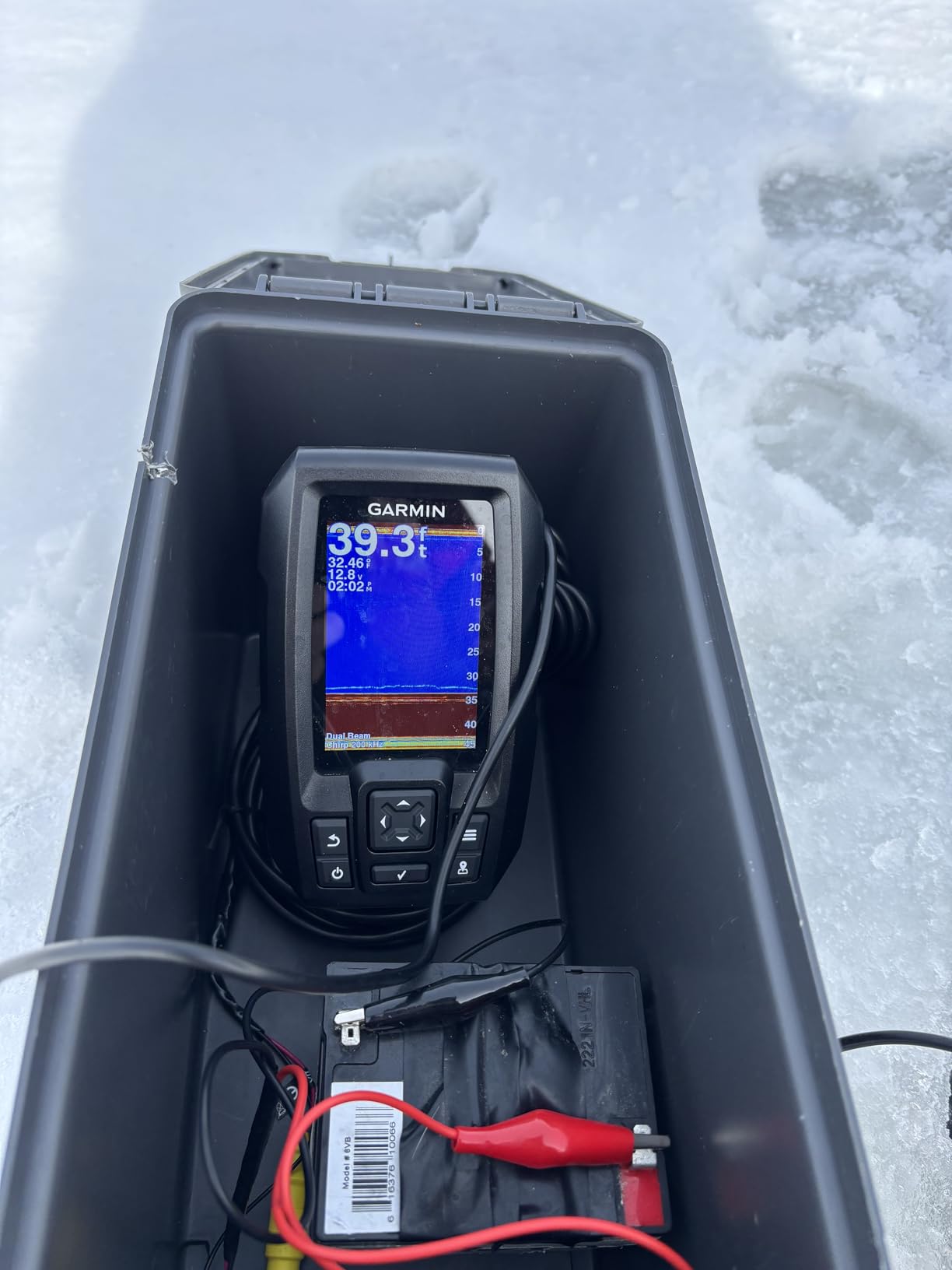
The Striker 4’s flasher display mode makes it a viable option for ice fishing, and many ice anglers have adopted it as their go-to portable fish finder. The compact size fits easily in a sled or backpack, and the unit powers up quickly in cold conditions.
In ice fishing applications, the flasher mode provides real-time display of the water column beneath your hole, showing your jig, any fish present, and the bottom. The CHIRP sonar provides good target separation, making it easier to distinguish between your lure and nearby fish. The zoom feature allows you to magnify a specific depth range, which is useful for focusing on fish that are holding at a particular depth.
Cold weather performance has been reliable in testing, with the unit powering up and functioning normally even in sub-freezing temperatures. The display remains readable in cold conditions, though you may need to increase the backlight brightness to compensate for the reduced visibility that can occur with LCD screens in extreme cold.
Speed and Boat Performance Impact
The Striker 4 maintains good sonar readings at slow to moderate speeds, typically up to about 10-15 mph depending on the transducer installation and hull type. At higher speeds, the turbulence and aeration around the transducer can cause the sonar to lose the bottom signal, which is normal for transom-mounted transducers on most fish finders.
For trolling applications, the Striker 4 performs excellently at typical trolling speeds of 1-5 mph, providing continuous, detailed sonar imagery of the water column and bottom. The GPS speed display helps you maintain consistent trolling speeds, which can be critical for effective lure presentation.
Night Fishing Performance
Night fishing is a popular pursuit for many anglers, and the Striker 4 handles low-light conditions with ease. The adjustable backlight allows you to set the display brightness to a comfortable level for night fishing without creating excessive glare that could spook fish or impair your night vision. The display is bright enough to read clearly in complete darkness, yet can be dimmed sufficiently to preserve your ability to see the water around you.
Several color palettes work particularly well for night fishing, with darker backgrounds and cooler color tones that are easier on the eyes during extended after-dark sessions. The ability to quickly adjust brightness without navigating through menus — using the dedicated backlight controls — is a practical advantage when you are trying to maintain your night vision while monitoring the sonar.
Many anglers report that they actually catch more fish at night, and having a reliable fish finder like the Striker 4 can be a significant advantage during these productive hours. The sonar works identically in darkness as it does in daylight, allowing you to locate fish, identify structure, and monitor the water column just as effectively as you would during daytime hours.
Performance in Different Water Conditions
Water clarity, temperature, and composition can all affect sonar performance, and understanding how the Striker 4 handles different conditions will help you get the best results. In clear water, the sonar performs at its peak, with excellent depth penetration and clean, well-defined returns. Fish and structure are easy to identify, and the CHIRP technology provides its best target separation in these ideal conditions.
In murky or turbid water, sonar performance is reduced but still functional. The sound waves can be absorbed and scattered by suspended particles, which reduces the effective depth and can introduce noise into the display. In these conditions, adjusting the sensitivity and using the 200 kHz frequency (which is less affected by turbidity than lower frequencies) can help maintain usable sonar imagery.
Weed-heavy environments present a unique challenge for any fish finder, as the sonar returns from dense vegetation can mask fish hiding within or below the weed bed. The Striker 4’s CHIRP sonar handles vegetation better than traditional single-frequency sonar, providing better penetration through weed layers and improved ability to distinguish fish from vegetation. Adjusting the sensitivity and using the 200 kHz frequency can further improve performance in weedy conditions.
Battery Life and Power Management
The Striker 4 is designed to be power-efficient, drawing approximately 0.23 amps at 12V during normal operation. This low power draw means that even a small 12V 7Ah battery can power the unit for an entire day of fishing — roughly 30 hours of continuous use. For kayak anglers and others who rely on portable power, this excellent battery life is a significant practical advantage.
When connected to a boat’s main battery through the engine’s charging system, power consumption is essentially a non-issue, as the alternator keeps the battery topped up while the engine is running. However, if you leave the fish finder running with the engine off for extended periods, be mindful of the cumulative power draw, especially if you are also running other electronics such as livewell pumps, navigation lights, or electric trolling motors.
Experience the Striker 4 Difference
Join thousands of anglers who trust the Striker 4 on every trip.
Buy on Amazon →How to Get the Most Out of Your Striker 4
Owning a capable fish finder is only half the battle — knowing how to use it effectively is what separates anglers who consistently find fish from those who stare at a screen full of meaningless pixels. This section covers practical tips and techniques for getting the most out of your Garmin Striker 4, from basic operation to advanced strategies that will help you catch more fish.
Understanding the Sonar Display
Before you can use the Striker 4 effectively, you need to understand what you are looking at on the screen. The traditional sonar display shows a scrolling history of sonar returns, with the most recent data on the right side of the screen and older data scrolling to the left. The bottom of the display represents the lake or river bottom, and everything between the surface (top of the screen) and the bottom represents the water column.
Fish appear on the display in several ways depending on their size, position, and movement relative to the sonar beam. A fish that passes through the sonar beam from one side to the other typically appears as an arc — the classic “fish arch” that is the hallmark of quality sonar display. The size and thickness of the arch generally correspond to the size of the fish, though factors like sonar beam width and fish speed also influence the arch appearance.
Not all fish appear as arches, however. A fish that is stationary within the sonar beam appears as a horizontal line or blob. Fish that are very close to the bottom may be difficult to distinguish from bottom returns. Schools of baitfish often appear as clouds or masses rather than individual arches. Learning to recognize these different presentations is key to effective fish finder use, and our detailed guide on how to read a fish finder covers these topics extensively.
Optimizing Sonar Settings for Different Conditions
The Striker 4 offers several adjustable sonar parameters that can be optimized for different fishing conditions. Here are the key settings and how to adjust them:
Sensitivity/Gain: This controls how much detail the sonar displays. In clear water with a hard bottom, the auto setting usually works well. In murky water or over soft, muddy bottoms, you may need to increase the sensitivity to detect fish that are close to the bottom. In very shallow water, reducing sensitivity prevents the display from being overwhelmed with surface and bottom clutter.
Scroll Speed: This controls how fast the sonar history scrolls across the screen. Slower scroll speeds provide more detail in a given area, while faster speeds cover more ground. When stationary or moving slowly, use a slow scroll speed. When moving quickly or searching for fish, increase the scroll speed to match your boat speed.
Depth Range: While the auto depth range setting works well in most situations, manually setting the depth range can be useful in specific scenarios. For example, if you are fishing in 20 feet of water and know the fish are holding in the 15-20 foot range, manually setting the depth range to 0-30 feet dedicates more screen resolution to the area of interest.
Frequency Selection: Use 77 kHz when searching for fish over a wide area, and switch to 200 kHz when you want detailed views of specific fish or structure. The split-screen mode allows you to view both frequencies simultaneously, which is useful for comparing the wide and narrow beam views.
Using the Flasher Mode Effectively
The flasher display mode is one of the Striker 4’s most underutilized features. While many anglers are familiar with the traditional scrolling sonar view, the flasher provides real-time information that can be incredibly valuable in certain situations.
The flasher displays a circular representation of the water column, with the surface at the outer edge and the bottom at the center (or vice versa, depending on the display orientation). Sonar returns appear as illuminated segments on the circle, with stronger returns appearing brighter. This real-time display allows you to see fish as they enter and leave the sonar beam, watch your lure as you jig it, and detect bites the instant they happen.
The flasher mode is particularly effective for ice fishing, vertical jigging, and any situation where you are fishing directly below the boat. It takes some practice to learn to read the flasher display, but once you are comfortable with it, many anglers find it more informative than the traditional scrolling view for these specific applications.
Effective Waypoint Strategies
The GPS waypoint functionality is one of the Striker 4’s most valuable features, and using it effectively can dramatically improve your fishing success over time. Here are some strategies for getting the most out of the waypoint system:
- Mark everything interesting: Do not just mark spots where you catch fish. Mark underwater structure, depth transitions, bottom composition changes, creek channels, points, humps, and any other feature that might attract fish. Over time, you will build a detailed database of productive areas.
- Use a consistent naming system: While the Striker 4 uses sequential numbering by default, you can rename waypoints to be more descriptive. Develop a naming system that helps you quickly identify what each waypoint represents.
- Mark spots at different water levels: If you fish reservoirs with fluctuating water levels, mark productive spots at various levels. A spot that is productive at normal pool may not be accessible at low water, and vice versa.
- Record conditions at each waypoint: Keep a separate log (notebook or phone app) that records the conditions at each productive waypoint — water temperature, weather, time of day, technique used, and species caught. This data helps you identify patterns and make better fishing decisions.
Maintaining Your Fish Finder
Proper maintenance ensures that your Striker 4 continues to perform at its best for years to come. Here are some maintenance tips:
- Clean the transducer regularly: Algae, barnacles, and other growth on the transducer face can degrade sonar performance. Clean the transducer with a soft cloth and mild soap after each use, especially in saltwater.
- Check connections periodically: Inspect the power cable and transducer cable connections for corrosion, looseness, or damage. Clean corroded connections with electrical contact cleaner and apply dielectric grease to prevent future corrosion.
- Rinse after saltwater use: Always rinse the entire unit — display, transducer, and cables — with fresh water after saltwater use. Salt spray and saltwater can cause corrosion and damage over time if not removed.
- Protect from extreme temperatures: While the Striker 4 is built to withstand a range of temperatures, prolonged exposure to extreme heat (such as leaving it in a closed vehicle in direct sunlight) can damage the display. Remove the unit or cover it when not in use.
- Update firmware when available: Garmin periodically releases firmware updates that can improve performance, fix bugs, and add features. Check the Garmin website for updates and install them using a micro-SD card.
Common Mistakes to Avoid
Even with a user-friendly fish finder like the Striker 4, there are some common mistakes that can limit your effectiveness on the water. Avoiding these pitfalls will help you get the most out of your investment:
- Ignoring the transducer angle: If the transducer is not mounted parallel to the water surface, the sonar beam will be angled and may miss fish or provide inaccurate depth readings. Take the time to ensure proper transducer alignment during installation.
- Running at high speed with sonar on: At speeds above about 15 mph, the turbulence around the transducer makes the sonar data unreliable. Either accept that the sonar will not read accurately at high speed, or turn the unit off when running between fishing spots to avoid filling the screen with meaningless noise.
- Over-relying on Fish ID: The Fish ID feature that displays fish icons can be helpful for beginners, but it can also produce false readings from weeds, debris, and bubbles. Learning to read raw sonar returns will make you a more effective angler in the long run.
- Not marking enough waypoints: Many anglers only mark spots where they catch fish, but marking structure, transitions, and other features builds a valuable database that helps you understand the water you fish. Mark anything that looks interesting — you can always delete waypoints later.
- Setting sensitivity too high: While higher sensitivity reveals more detail, setting it too high fills the screen with noise and makes it harder to identify real targets. Start with the auto setting and adjust gradually from there.
- Neglecting the transducer: A dirty transducer with algae, barnacles, or mineral deposits will not perform optimally. Make cleaning the transducer part of your regular boat maintenance routine.
Seasonal Tips for Striker 4 Users
Fish behavior changes with the seasons, and adjusting how you use your Striker 4 to match these patterns can improve your catch rate throughout the year. Here are some seasonal tips for getting the most out of your fish finder:
Spring: As water temperatures rise, fish become more active and move from deep winter haunts to shallower spawning areas. Use your Striker 4’s temperature sensor to track the warming water and identify the temperature ranges that trigger increased activity for your target species. Mark transition areas where fish are likely to stage before moving shallow.
Summer: During the warmest months, many fish species seek out cooler, more oxygenated water. Look for thermoclines on your sonar display — these temperature boundaries often concentrate fish. The Striker 4’s CHIRP sonar is excellent at identifying thermoclines, which appear as a distinct horizontal band of returns on the display. Focus your fishing efforts at and just above the thermocline depth.
Fall: As water cools in autumn, fish begin feeding aggressively in preparation for winter. They often follow baitfish into transitional areas between deep and shallow water. Use the 77 kHz wide beam to search for schools of baitfish, then switch to 200 kHz to examine them closely and look for predator fish nearby.
Winter: In cold water, fish become lethargic and hold in deeper, more stable water. The Striker 4’s flasher mode is invaluable for ice fishing, allowing you to watch your presentation and detect the subtle bites that are common in cold water. Mark productive winter holes with waypoints so you can return to them consistently.
Pros & Cons — The Honest Assessment
Every fish finder has strengths and weaknesses, and the Garmin Striker 4 is no exception. After extensive testing and comparison with competing units, here is our honest assessment of what the Striker 4 does well and where it falls short.
✓ What We Love
- Excellent CHIRP sonar quality — Clear fish arches, great target separation, and reliable fish detection that rivals more expensive units
- Built-in GPS — Waypoint marking and basic navigation add tremendous value at this price point
- Outstanding value for money — Delivers premium-level sonar performance at a budget-friendly price
- Incredibly easy to use — Intuitive interface and physical buttons that work in all conditions, including wet hands and gloves
- Compact and lightweight — Ideal for kayaks, canoes, small boats, and ice fishing
- IPX7 waterproof rating — Handles splashes, rain, and spray with confidence
- Dual-frequency sonar — 77 kHz for wide coverage and 200 kHz for detailed views
- Flasher mode included — Real-time sonar display for ice fishing and vertical jigging
- Low power consumption — Runs all day on small batteries, perfect for portable applications
- Multiple mounting options — Transom mount and trolling motor mount hardware included
- Water temperature sensor — Built into the transducer for continuous temperature monitoring
- Garmin reliability — Backed by Garmin’s reputation for quality marine electronics
✗ What Could Be Better
- Small 3.5-inch screen — Can feel cramped, especially in split-screen mode or for aging eyes
- No detailed maps or charts — GPS plotter only, without preloaded cartography or map card support
- No networking capabilities — Cannot share data with other devices or connect to external sensors
- Limited screen resolution — 480×320 pixels is adequate but noticeably lower than premium units
- No touchscreen — While physical buttons have advantages, some users prefer touchscreen navigation
- No Wi-Fi or Bluetooth connectivity — Cannot sync data to a phone or tablet app
- Basic waypoint management — No ability to organize waypoints into groups or folders
- No side imaging or down imaging — Traditional sonar only, without the advanced imaging found on pricier units
Who Should Buy the Striker 4
The Garmin Striker 4 is an excellent choice for several types of anglers. If you are a beginner looking for your first fish finder, the Striker 4 provides a gentle learning curve with enough capability to grow with you as your skills develop. If you are a kayak angler or small boat owner who needs a compact, portable fish finder, the Striker 4’s size and power efficiency make it an ideal choice. If you are an experienced angler looking for a reliable backup unit or a dedicated ice fishing fish finder, the Striker 4 delivers the performance you need at a price that does not break the bank.
Who Should Consider Other Options
If you need a larger screen for better visibility, detailed mapping and chartplotter functionality, side imaging or down imaging sonar, or networking capabilities to share data between multiple displays, you will want to look at more advanced (and more expensive) options. The Striker 4 is designed to excel at the fundamentals, and it does so admirably, but it is not trying to be everything to everyone.
Anglers who fish large, unfamiliar bodies of water and rely heavily on detailed charts for navigation may find the Striker 4’s basic GPS plotter limiting. In this case, stepping up to a unit with built-in cartography, such as the Garmin ECHOMAP series, would be a worthwhile investment. Similarly, tournament anglers who need the absolute best sonar performance and advanced features like LiveScope compatibility will want to look at Garmin’s higher-end offerings.
See Why Anglers Love the Striker 4
Thousands of verified reviews. Check the latest deals on Amazon.
View on Amazon →How the Striker 4 Stacks Up Against the Competition
The budget fish finder market is competitive, with several strong contenders vying for your hard-earned dollars. To help you make an informed decision, we have compared the Garmin Striker 4 against its most popular competitors across a range of important criteria. This head-to-head analysis will show you where the Striker 4 leads, where it trails, and how it fits into the broader landscape of affordable fish finders.
Garmin Striker 4 vs. Lowrance Hook Reveal 5
The Lowrance Hook Reveal is one of the Striker 4’s most direct competitors, offering a similar combination of sonar and GPS at a comparable price point. The Hook Reveal features a larger 5-inch screen compared to the Striker 4’s 3.5-inch display, which is a significant advantage for anglers who want more screen real estate. However, the Striker 4 counters with a more compact form factor that is better suited for kayaks and small boats.
In terms of sonar performance, both units deliver excellent results for their price range. The Hook Reveal offers Lowrance’s FishReveal technology, which combines traditional sonar with down imaging to create a more detailed picture of fish and structure. The Striker 4 relies on its CHIRP sonar alone, which produces cleaner fish arches but lacks the imaging detail of the Hook Reveal’s combined approach.
The GPS systems are comparable, with both offering waypoint marking and basic navigation. Neither unit includes detailed cartography at the base price level, though the Hook Reveal is available in bundles with C-MAP or Navionics charts. For anglers who want mapping capability, the Hook Reveal has a slight edge in bundle options.
| Feature | Garmin Striker 4 | Lowrance Hook Reveal 5 |
|---|---|---|
| Display Size | 3.5 inches | 5 inches |
| Resolution | 480 x 320 | 800 x 480 |
| Sonar Type | CHIRP | CHIRP + DownScan |
| Max Depth (Fresh) | 1,600 ft | 1,000 ft |
| GPS | Built-in | Built-in |
| Waypoints | 5,000 | 3,000 |
| Maps | None (plotter only) | Optional bundles |
| Water Rating | IPX7 | IPX7 |
| Best For | Kayak, small boats, portability | Larger boats, screen size priority |
Garmin Striker 4 vs. Humminbird HELIX 5
The Humminbird HELIX 5 is another popular competitor that offers a larger screen and additional features compared to the Striker 4. The HELIX 5 features a 5-inch color display with 800 x 480 pixel resolution, providing noticeably more screen space and sharper imagery than the Striker 4’s 3.5-inch display.
Where the Striker 4 fights back is in sonar quality and simplicity. Garmin’s CHIRP sonar technology produces cleaner, more defined fish arches than the HELIX 5’s standard sonar in many conditions. The Striker 4 is also simpler to set up and use, with a more intuitive menu system that gets you fishing faster. For anglers who value simplicity and sonar quality over screen size, the Striker 4 is the stronger choice.
The HELIX 5 does offer some features that the Striker 4 lacks, including optional down imaging and side imaging on higher-end models, as well as support for Humminbird’s AutoChart Live mapping. However, these features come at a higher price point, and the base HELIX 5 model is comparable to the Striker 4 in terms of core functionality.
| Feature | Garmin Striker 4 | Humminbird HELIX 5 |
|---|---|---|
| Display Size | 3.5 inches | 5 inches |
| Resolution | 480 x 320 | 800 x 480 |
| Sonar Type | CHIRP | Standard Dual Beam |
| Max Depth (Fresh) | 1,600 ft | 1,500 ft |
| GPS | Built-in | Built-in |
| Waypoints | 5,000 | 2,500 |
| Imaging Options | None | Optional (higher models) |
| Best For | Simplicity, CHIRP quality, portability | Screen size, expandability |
Garmin Striker 4 vs. Deeper PRO+
The Deeper PRO+ is a different type of fish finder entirely — a castable sonar ball that connects to your smartphone via Wi-Fi. This comparison is relevant because many kayak anglers and shore fishermen consider both options. The Deeper PRO+ offers the advantage of being completely portable with no installation required; you simply cast it into the water and view the sonar data on your phone.
However, the Striker 4 offers several significant advantages over the Deeper PRO+. The sonar quality is superior, with better target separation and more consistent fish arches. The Striker 4 does not depend on a phone or tablet, which means no battery drain on your mobile device and no concerns about screen visibility in bright sunlight (phone screens are often harder to read than dedicated fish finder displays). The Striker 4 also provides continuous sonar data while the boat is moving, whereas the Deeper PRO+ is designed primarily for stationary or slow-moving use.
The Deeper PRO+ does have the advantage of built-in GPS for bathymetric mapping, which allows you to create depth maps of the waters you fish. This is a feature the Striker 4 lacks. However, for most anglers, the Striker 4’s superior sonar performance, dedicated display, and lower price make it the better overall choice.
Garmin Striker 4 vs. Garmin Striker Plus 4
Within Garmin’s own lineup, the Striker Plus 4 is the natural step up from the Striker 4. The two units share the same display size and resolution, but the Striker Plus 4 adds Garmin’s Quickdraw Contours feature, which allows you to create your own HD depth maps in real time as you fish. This is a genuinely useful feature for anglers who fish uncharted or poorly mapped waters.
The Striker Plus 4 also includes a slightly improved user interface and some additional sonar features. However, the core sonar performance is very similar between the two units, and the price difference is modest. If Quickdraw Contours is important to you, the Striker Plus 4 is worth the upgrade. If you primarily fish well-known waters and do not need custom mapping, the standard Striker 4 offers better value.
Garmin Striker 4 vs. Venterior Portable Fish Finder
At the ultra-budget end of the market, portable castable fish finders like the Venterior VT-FF001 offer basic sonar capabilities at a fraction of the Striker 4’s price. These units typically use a floating sonar sensor that transmits data to a handheld display unit, providing basic depth and fish detection without any permanent installation.
While these ultra-budget options can be useful for casual anglers or as a quick way to check depth, they cannot match the Striker 4’s sonar quality, feature set, or reliability. The CHIRP sonar in the Striker 4 provides dramatically better fish detection, target separation, and bottom definition compared to the simple single-frequency sonar found in most portable units. The GPS functionality, flasher mode, and customizable sonar settings of the Striker 4 are features that ultra-budget fish finders simply do not offer.
For anglers who are serious about using a fish finder as a tool to improve their fishing, the Striker 4 represents a much better investment than ultra-budget alternatives. The difference in sonar quality alone justifies the price difference, and the additional features and build quality make the Striker 4 a far more capable and durable tool. If budget is extremely tight, a portable fish finder can serve as a temporary solution, but most anglers will be much better served by investing in the Striker 4 from the start.
Garmin Striker 4 vs. Garmin ECHOMAP UHD2 52cv
For anglers who want to stay within the Garmin ecosystem but need more advanced features, the ECHOMAP UHD2 52cv represents a significant step up from the Striker 4. The ECHOMAP adds a larger 5-inch touchscreen display, detailed coastal and inland charts, ClearVü down imaging sonar, and networking capabilities that allow data sharing between compatible devices.
However, the ECHOMAP UHD2 52cv costs significantly more than the Striker 4, and many of its advanced features may be unnecessary for casual or budget-conscious anglers. The Striker 4’s CHIRP sonar is comparable to the ECHOMAP’s traditional sonar in terms of fish detection and target separation, so you are not sacrificing core sonar quality by choosing the less expensive unit.
The decision between the Striker 4 and the ECHOMAP comes down to your specific needs and budget. If you need detailed charts, down imaging, or touchscreen operation, the ECHOMAP is worth the investment. If you primarily need excellent CHIRP sonar and basic GPS at an affordable price, the Striker 4 is the smarter choice. Many anglers start with the Striker 4 and upgrade to the ECHOMAP later as their needs and budget allow.
Overall Competitive Position
In the broader competitive landscape, the Garmin Striker 4 occupies a sweet spot that is difficult for competitors to match. It offers the best combination of sonar quality, ease of use, build quality, and GPS functionality at its price point. While competitors may offer larger screens or additional features, they typically do so at higher price points or with compromises in other areas such as sonar quality or ease of use.
For anglers who prioritize sonar performance and simplicity over screen size and advanced features, the Striker 4 remains the top choice in the budget category. If you want to explore more options across all price ranges, check out our comprehensive guide to the best fish finders available today.
Best Value in Its Class
The Garmin Striker 4 consistently outperforms competitors at the same price.
Get Yours on Amazon →Complete Buying Guide — Is the Striker 4 Right for You?
Choosing a fish finder is a personal decision that depends on your specific needs, fishing style, boat type, and budget. This buying guide will help you determine whether the Garmin Striker 4 is the right choice for your situation, and what factors you should consider before making your purchase.
What to Consider Before Buying
Before purchasing any fish finder, it is important to honestly assess your needs and expectations. Here are the key factors to consider:
Your boat type and size: The Striker 4’s compact size makes it ideal for kayaks, canoes, small boats, and jon boats. If you have a larger boat with ample console space, you may prefer a unit with a larger screen for better visibility. The Striker 4 works fine on larger boats, but the 3.5-inch screen can feel small when you are sitting several feet away from the display.
Your fishing environment: The Striker 4 excels in freshwater environments and handles inshore saltwater well. If you primarily fish deep offshore waters, you may need a unit with greater depth capability and more advanced sonar features. For freshwater lakes, rivers, and ponds, the Striker 4 is more than capable.
Your experience level: The Striker 4 is an excellent choice for beginners due to its intuitive interface and easy setup. Experienced anglers will appreciate the CHIRP sonar quality and GPS functionality, though they may eventually want to upgrade to a unit with more advanced features like side imaging or detailed mapping.
Your budget: The Striker 4 is one of the most affordable fish finders that offers both quality CHIRP sonar and built-in GPS. If your budget is tight, the Striker 4 delivers exceptional value. If you can stretch your budget a bit more, the Striker Plus 4 adds Quickdraw Contours for custom mapping, which is a worthwhile upgrade for many anglers.
When to Choose the Striker 4 Over Alternatives
The Striker 4 is the right choice when you want reliable, high-quality sonar without paying for features you do not need. It is the right choice when portability and compact size are priorities. It is the right choice when you want a fish finder that works great right out of the box without a complicated setup process. And it is the right choice when you want the peace of mind that comes with buying from Garmin, one of the most trusted names in marine electronics.
If you need a larger screen, consider the Striker 4cv (4-inch) or Striker 7sv (7-inch) models, which offer the same sonar technology in larger form factors. If you need detailed mapping, look at the Striker Plus series or the Garmin ECHOMAP lineup. If you need side imaging or down imaging, you will need to step up to a more advanced (and more expensive) unit.
Understanding the Different Striker Models
Garmin’s Striker lineup can be confusing, so here is a quick breakdown of the key differences:
| Model | Screen | CHIRP | Quickdraw | ClearVü | Best For |
|---|---|---|---|---|---|
| Striker 4 | 3.5″ | ✓ | ✗ | ✗ | Budget, kayak, portability |
| Striker Plus 4 | 4.3″ | ✓ | ✓ | ✗ | Custom mapping on a budget |
| Striker Plus 5cv | 5″ | ✓ | ✓ | ✓ | Mid-size, down imaging |
| Striker Plus 7sv | 7″ | ✓ | ✓ | ✓ | Large screen, full featured |
Accessories Worth Considering
While the Striker 4 comes with everything you need for basic operation, several accessories can enhance your experience:
- Protective cover: A fitted cover protects the display from sun damage, scratches, and debris when not in use. This is especially important if the unit is mounted in an exposed location.
- Upgraded transducer: While the included transducer is perfectly capable, upgrading to a higher-performance transducer can improve sonar quality, especially at greater depths.
- RAM mount or rail mount: For kayak anglers, a RAM mount or rail mount system provides a secure, adjustable mounting solution that works with various kayak configurations.
- Dedicated battery: A small 12V lithium battery provides clean, reliable power for the Striker 4 without tapping into your boat’s main battery. This is particularly useful for kayaks and small boats without a built-in electrical system.
- Sun cover or hood: A simple sun shade can significantly improve screen visibility in bright conditions by reducing glare on the display.
- Carry case: For ice fishing or portable applications, a padded carry case protects the unit during transport and storage.
Warranty and Customer Support
Garmin backs the Striker 4 with a solid warranty that covers defects in materials and workmanship. The standard warranty period provides peace of mind that your investment is protected, and Garmin’s customer support team is widely regarded as one of the best in the marine electronics industry. If you encounter any issues with your Striker 4, Garmin’s support team is accessible by phone, email, and online chat, and they are known for providing helpful, knowledgeable assistance.
In addition to the standard warranty, Garmin offers an extended warranty program that provides additional coverage for a nominal fee. For anglers who plan to use their Striker 4 heavily or in demanding conditions, the extended warranty can be a worthwhile investment for the added peace of mind it provides.
Garmin also maintains a comprehensive online support library that includes product manuals, troubleshooting guides, firmware updates, and how-to videos. This self-service resource is available 24/7 and can help you resolve many common issues without needing to contact customer support directly. The firmware update process is straightforward and can be completed using a micro-SD card, ensuring that your Striker 4 stays current with the latest improvements and bug fixes.
Long-Term Value and Resale
One often-overlooked aspect of the Striker 4’s value proposition is its strong resale value. Garmin products tend to hold their value well on the used market, thanks to the brand’s reputation for quality and durability. If you eventually decide to upgrade to a more advanced fish finder, you can expect to recoup a reasonable portion of your initial investment by selling your Striker 4 on the used market.
The durability of the Striker 4 also contributes to its long-term value. Unlike cheaper fish finders that may need to be replaced after a season or two of regular use, the Striker 4 is built to last for years. The robust construction, quality components, and reliable electronics mean that your Striker 4 should continue to perform well long after cheaper alternatives have failed. When you factor in the longer lifespan, the cost per season of ownership is actually quite low, making the Striker 4 an even better value than its purchase price suggests.
Where to Buy
The Garmin Striker 4 is widely available from major retailers, marine electronics dealers, and online marketplaces. Amazon is a popular choice due to competitive pricing, fast shipping, and a generous return policy. When purchasing, make sure you are buying from an authorized Garmin dealer to ensure full warranty coverage.
Watch for sales events and bundle deals, which can offer significant savings. Some retailers bundle the Striker 4 with additional accessories like protective covers, extra mounting hardware, or upgraded transducers at a package price that is lower than buying the items separately.
Our Recommendation
If you are looking for a reliable, easy-to-use fish finder with excellent sonar quality and built-in GPS at a budget-friendly price, the Garmin Striker 4 is one of the best options available. It delivers where it matters most — finding fish — and does so with the quality and reliability that Garmin is known for. For kayak anglers, beginners, and anyone who values simplicity and performance over flashy features, the Striker 4 is an outstanding choice.
Frequently Asked Questions
Final Verdict
After thoroughly testing and evaluating the Garmin Striker 4 across multiple fishing environments and conditions, our verdict is clear: this is one of the best fish finders you can buy at its price point, and it remains a top recommendation for anglers who want reliable performance without breaking the bank.
The Striker 4 excels where it matters most. Its CHIRP sonar delivers clear, well-defined fish arches and excellent target separation that rivals units costing significantly more. The built-in GPS adds genuine value with waypoint marking and basic navigation that helps you become a more efficient and successful angler over time. The compact, durable build is perfect for kayaks, small boats, and portable applications, and the intuitive interface means you can be up and running within minutes of installation.
Yes, the 3.5-inch screen is small by modern standards. Yes, it lacks the detailed mapping, networking capabilities, and advanced imaging features found on more expensive units. But these are not shortcomings — they are deliberate design choices that allow Garmin to deliver exceptional sonar and GPS performance at a price that is accessible to virtually any angler.
If you are buying your first fish finder, upgrading from an older or lower-quality unit, looking for a dedicated kayak or ice fishing fish finder, or simply want a reliable backup unit that you can count on, the Garmin Striker 4 deserves a spot at the top of your list. It does the fundamentals exceptionally well, and in fishing, that is what matters most.
The Striker 4 has earned its reputation as one of the best-selling fish finders on the market, and after spending significant time with it on the water, we understand why. It is a no-nonsense, high-performance fish finder that delivers exactly what it promises — and at this price, that is a promise worth taking to the bank.
Ready to Find More Fish?
The Garmin Striker 4 delivers professional-grade sonar and GPS at a price every angler can afford. Join the thousands of fishermen who trust this unit on every trip.
Get the Garmin Striker 4 on Amazon →